> ## Documentation Index
> Fetch the complete documentation index at: https://docs-staging-fix-cli-comand.mintlify.site/llms.txt
> Use this file to discover all available pages before exploring further.

> Learn how to configure an update policy form using Forms for Actions for users to review and accept new terms of service or consent updates.

# Use Cases: Configure an update policy form using Forms

<Card title="Before you start">
  1. Create a [Machine-to-Machine Application](/docs/get-started/auth0-overview/create-applications/machine-to-machine-apps) with the following scopes enabled:

  * `read:users`
  * `update:users`
  * `create:users`
  * `read:users_app_metadata`
  * `update:users_app_metadata`
  * `create:users_app_metadata`

  2. Add a [Vault connection](/docs/customize/forms/vault) using the M2M application credentials.
</Card>

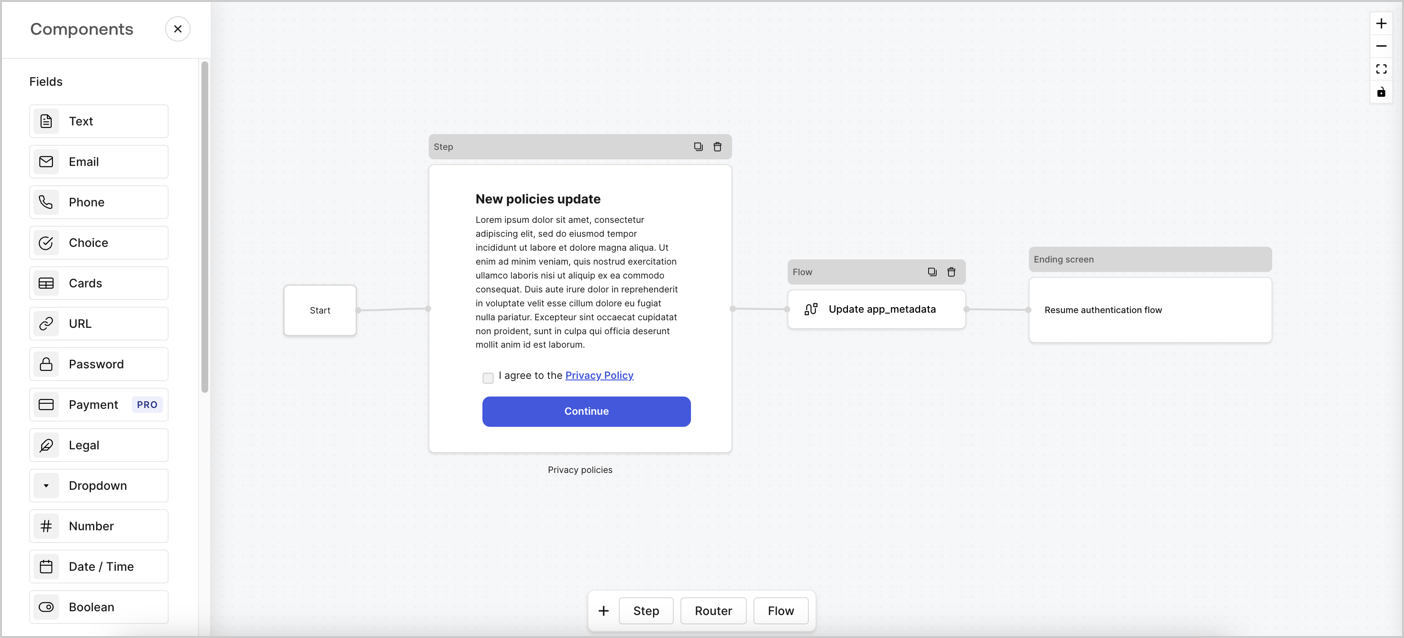
Forms for Actions allows you to create custom privacy policies flows and store the consent under the `app_metadata` object.
<Frame>
  <img src="https://mintcdn.com/docs-staging-fix-cli-comand/hRNZ_VMQ3dKfW-Ml/docs/images/cdy7uua7fh8z/6i68dMvHDTijfRmSgN1x8Q/ad900e7d4c0fb34645921435472b8684/privavy-policy-form.png?fit=max&auto=format&n=hRNZ_VMQ3dKfW-Ml&q=85&s=3882a96f5e3f57e05a58f2a111443c79" alt="Dashboard > Actions > Forms > Privacy policy use case" data-og-width="1404" width="1404" data-og-height="638" height="638" data-path="docs/images/cdy7uua7fh8z/6i68dMvHDTijfRmSgN1x8Q/ad900e7d4c0fb34645921435472b8684/privavy-policy-form.png" data-optimize="true" data-opv="3" srcset="https://mintcdn.com/docs-staging-fix-cli-comand/hRNZ_VMQ3dKfW-Ml/docs/images/cdy7uua7fh8z/6i68dMvHDTijfRmSgN1x8Q/ad900e7d4c0fb34645921435472b8684/privavy-policy-form.png?w=280&fit=max&auto=format&n=hRNZ_VMQ3dKfW-Ml&q=85&s=d444b35cbf991a92d15dbd488b9c6d8c 280w, https://mintcdn.com/docs-staging-fix-cli-comand/hRNZ_VMQ3dKfW-Ml/docs/images/cdy7uua7fh8z/6i68dMvHDTijfRmSgN1x8Q/ad900e7d4c0fb34645921435472b8684/privavy-policy-form.png?w=560&fit=max&auto=format&n=hRNZ_VMQ3dKfW-Ml&q=85&s=d17965b1ab50dcaea837d0d6668a9610 560w, https://mintcdn.com/docs-staging-fix-cli-comand/hRNZ_VMQ3dKfW-Ml/docs/images/cdy7uua7fh8z/6i68dMvHDTijfRmSgN1x8Q/ad900e7d4c0fb34645921435472b8684/privavy-policy-form.png?w=840&fit=max&auto=format&n=hRNZ_VMQ3dKfW-Ml&q=85&s=66c95234b0a0cfbd879a52b2e7069f2b 840w, https://mintcdn.com/docs-staging-fix-cli-comand/hRNZ_VMQ3dKfW-Ml/docs/images/cdy7uua7fh8z/6i68dMvHDTijfRmSgN1x8Q/ad900e7d4c0fb34645921435472b8684/privavy-policy-form.png?w=1100&fit=max&auto=format&n=hRNZ_VMQ3dKfW-Ml&q=85&s=f1b9399cb632c54c76f745f853a3fa96 1100w, https://mintcdn.com/docs-staging-fix-cli-comand/hRNZ_VMQ3dKfW-Ml/docs/images/cdy7uua7fh8z/6i68dMvHDTijfRmSgN1x8Q/ad900e7d4c0fb34645921435472b8684/privavy-policy-form.png?w=1650&fit=max&auto=format&n=hRNZ_VMQ3dKfW-Ml&q=85&s=4f84aec2125f3cef205363fa591e4999 1650w, https://mintcdn.com/docs-staging-fix-cli-comand/hRNZ_VMQ3dKfW-Ml/docs/images/cdy7uua7fh8z/6i68dMvHDTijfRmSgN1x8Q/ad900e7d4c0fb34645921435472b8684/privavy-policy-form.png?w=2500&fit=max&auto=format&n=hRNZ_VMQ3dKfW-Ml&q=85&s=1819fb3ca53af9761b4f063804759325 2500w" />
</Frame>

The sections below outline how you can create an Update Policy form using nodes and flows, along with steps for adding your form to a [Post Login](/docs/customize/actions/explore-triggers/signup-and-login-triggers/login-trigger) Action.

## Create a form from scratch

Follow these steps to create a form to gather information:

1. Open the Form editor by selecting **Auth0 Dashboard > Actions > Forms.**
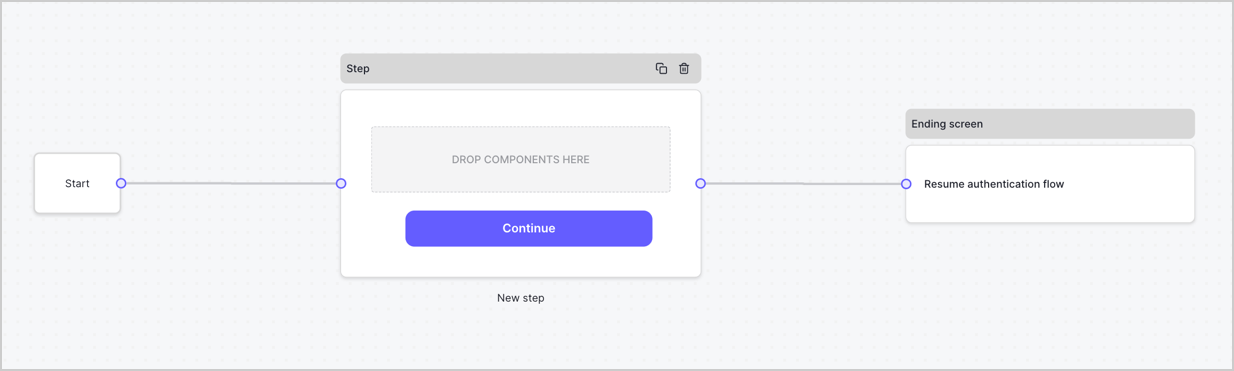
2. Select **Create Form** > **Start from scratch**.

By default, a new form contains a Start node, a Step node, and an Ending screen node.
<Frame>
  <img src="https://mintcdn.com/docs-staging-fix-cli-comand/W0jBP6sScXr0aykm/docs/images/cdy7uua7fh8z/2TZ9jSjgEcARFpULI6hz4R/a4319a1bd482f2ee5cc23100fdb2f42c/New-form-Forms-for-action-use-case.png?fit=max&auto=format&n=W0jBP6sScXr0aykm&q=85&s=d115fcf10266595bab87723bb84db38b" alt="Dashboard > Forms > Use Cases > Form" data-og-width="1234" width="1234" data-og-height="371" height="371" data-path="docs/images/cdy7uua7fh8z/2TZ9jSjgEcARFpULI6hz4R/a4319a1bd482f2ee5cc23100fdb2f42c/New-form-Forms-for-action-use-case.png" data-optimize="true" data-opv="3" srcset="https://mintcdn.com/docs-staging-fix-cli-comand/W0jBP6sScXr0aykm/docs/images/cdy7uua7fh8z/2TZ9jSjgEcARFpULI6hz4R/a4319a1bd482f2ee5cc23100fdb2f42c/New-form-Forms-for-action-use-case.png?w=280&fit=max&auto=format&n=W0jBP6sScXr0aykm&q=85&s=78508f1348c6cf0f19ec45d2ccfc9f3a 280w, https://mintcdn.com/docs-staging-fix-cli-comand/W0jBP6sScXr0aykm/docs/images/cdy7uua7fh8z/2TZ9jSjgEcARFpULI6hz4R/a4319a1bd482f2ee5cc23100fdb2f42c/New-form-Forms-for-action-use-case.png?w=560&fit=max&auto=format&n=W0jBP6sScXr0aykm&q=85&s=3c211cac5a045317a212d4e6c06566d8 560w, https://mintcdn.com/docs-staging-fix-cli-comand/W0jBP6sScXr0aykm/docs/images/cdy7uua7fh8z/2TZ9jSjgEcARFpULI6hz4R/a4319a1bd482f2ee5cc23100fdb2f42c/New-form-Forms-for-action-use-case.png?w=840&fit=max&auto=format&n=W0jBP6sScXr0aykm&q=85&s=f1964d2f18a443b2bb5bb63c27fdb8f3 840w, https://mintcdn.com/docs-staging-fix-cli-comand/W0jBP6sScXr0aykm/docs/images/cdy7uua7fh8z/2TZ9jSjgEcARFpULI6hz4R/a4319a1bd482f2ee5cc23100fdb2f42c/New-form-Forms-for-action-use-case.png?w=1100&fit=max&auto=format&n=W0jBP6sScXr0aykm&q=85&s=548e570ebfbfb38543651d4defbd22c4 1100w, https://mintcdn.com/docs-staging-fix-cli-comand/W0jBP6sScXr0aykm/docs/images/cdy7uua7fh8z/2TZ9jSjgEcARFpULI6hz4R/a4319a1bd482f2ee5cc23100fdb2f42c/New-form-Forms-for-action-use-case.png?w=1650&fit=max&auto=format&n=W0jBP6sScXr0aykm&q=85&s=f11763ed44fa28602194f41ab694dd50 1650w, https://mintcdn.com/docs-staging-fix-cli-comand/W0jBP6sScXr0aykm/docs/images/cdy7uua7fh8z/2TZ9jSjgEcARFpULI6hz4R/a4319a1bd482f2ee5cc23100fdb2f42c/New-form-Forms-for-action-use-case.png?w=2500&fit=max&auto=format&n=W0jBP6sScXr0aykm&q=85&s=a9e7f38e1ea578a0c20c3fe08c392928 2500w" />
</Frame>

### Configure the Step node

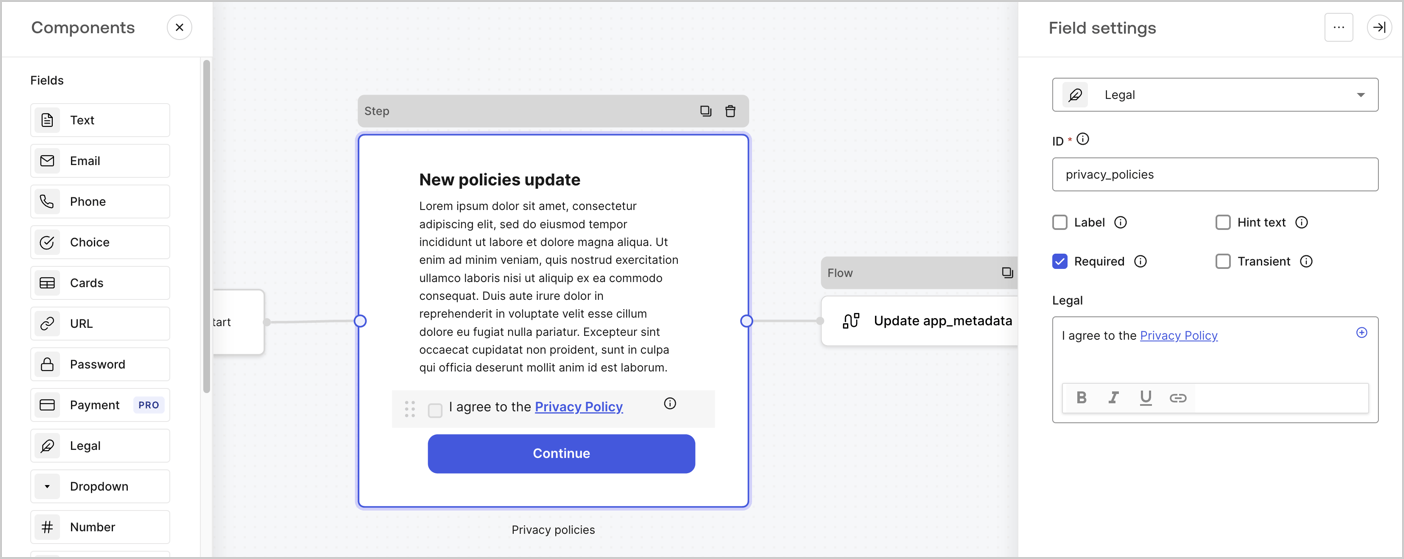
The Step node is the graphical interface visible to users. Add [Fields](/docs/customize/forms/nodes-and-components) to the Step node to collect the new agreement acceptance value by following these steps:

1. Drag a **Rich text** field from the **Components menu** into the **Step** node.

   * **Rich text**: Enter a description of your privacy policies updates.
   * Select **Save**.
2. Drag a **Legal** field into the **Step** node.

   * **ID**: Enter `privacy_policies`.
   * **Required**: Enable the checkbox.
   * **Legal**: Enter `I agree to the Privacy Policy`.
   * Select **Save**.
3. Select **Publish** to save.
<Frame>
  <img src="https://mintcdn.com/docs-staging-fix-cli-comand/iL6nnE17Za37Ahb-/docs/images/cdy7uua7fh8z/59zFFjQjAnjogkc2QGIqqJ/0ad66b1b636544122aa4e65968b76c2c/privacy-policy-step-node.png?fit=max&auto=format&n=iL6nnE17Za37Ahb-&q=85&s=20670214698c6f1b3ac3e1947f5236d0" alt="Dashboard > Actions > Forms > Use case privacy policy step node" data-og-width="1404" width="1404" data-og-height="559" height="559" data-path="docs/images/cdy7uua7fh8z/59zFFjQjAnjogkc2QGIqqJ/0ad66b1b636544122aa4e65968b76c2c/privacy-policy-step-node.png" data-optimize="true" data-opv="3" srcset="https://mintcdn.com/docs-staging-fix-cli-comand/iL6nnE17Za37Ahb-/docs/images/cdy7uua7fh8z/59zFFjQjAnjogkc2QGIqqJ/0ad66b1b636544122aa4e65968b76c2c/privacy-policy-step-node.png?w=280&fit=max&auto=format&n=iL6nnE17Za37Ahb-&q=85&s=967999be4dadb10ee52c5ad338ea4122 280w, https://mintcdn.com/docs-staging-fix-cli-comand/iL6nnE17Za37Ahb-/docs/images/cdy7uua7fh8z/59zFFjQjAnjogkc2QGIqqJ/0ad66b1b636544122aa4e65968b76c2c/privacy-policy-step-node.png?w=560&fit=max&auto=format&n=iL6nnE17Za37Ahb-&q=85&s=be9524a02451d972a48302a1d312f0b9 560w, https://mintcdn.com/docs-staging-fix-cli-comand/iL6nnE17Za37Ahb-/docs/images/cdy7uua7fh8z/59zFFjQjAnjogkc2QGIqqJ/0ad66b1b636544122aa4e65968b76c2c/privacy-policy-step-node.png?w=840&fit=max&auto=format&n=iL6nnE17Za37Ahb-&q=85&s=eba333d96fb565337d47e13689d960be 840w, https://mintcdn.com/docs-staging-fix-cli-comand/iL6nnE17Za37Ahb-/docs/images/cdy7uua7fh8z/59zFFjQjAnjogkc2QGIqqJ/0ad66b1b636544122aa4e65968b76c2c/privacy-policy-step-node.png?w=1100&fit=max&auto=format&n=iL6nnE17Za37Ahb-&q=85&s=668d860c8e4cc600c39d9d24a87c34c1 1100w, https://mintcdn.com/docs-staging-fix-cli-comand/iL6nnE17Za37Ahb-/docs/images/cdy7uua7fh8z/59zFFjQjAnjogkc2QGIqqJ/0ad66b1b636544122aa4e65968b76c2c/privacy-policy-step-node.png?w=1650&fit=max&auto=format&n=iL6nnE17Za37Ahb-&q=85&s=0fe671e4ad7983bedd474f8697cc6ee4 1650w, https://mintcdn.com/docs-staging-fix-cli-comand/iL6nnE17Za37Ahb-/docs/images/cdy7uua7fh8z/59zFFjQjAnjogkc2QGIqqJ/0ad66b1b636544122aa4e65968b76c2c/privacy-policy-step-node.png?w=2500&fit=max&auto=format&n=iL6nnE17Za37Ahb-&q=85&s=343214506935c3f713d7f1aedffe1cd1 2500w" />
</Frame>

### Configure the Flow node

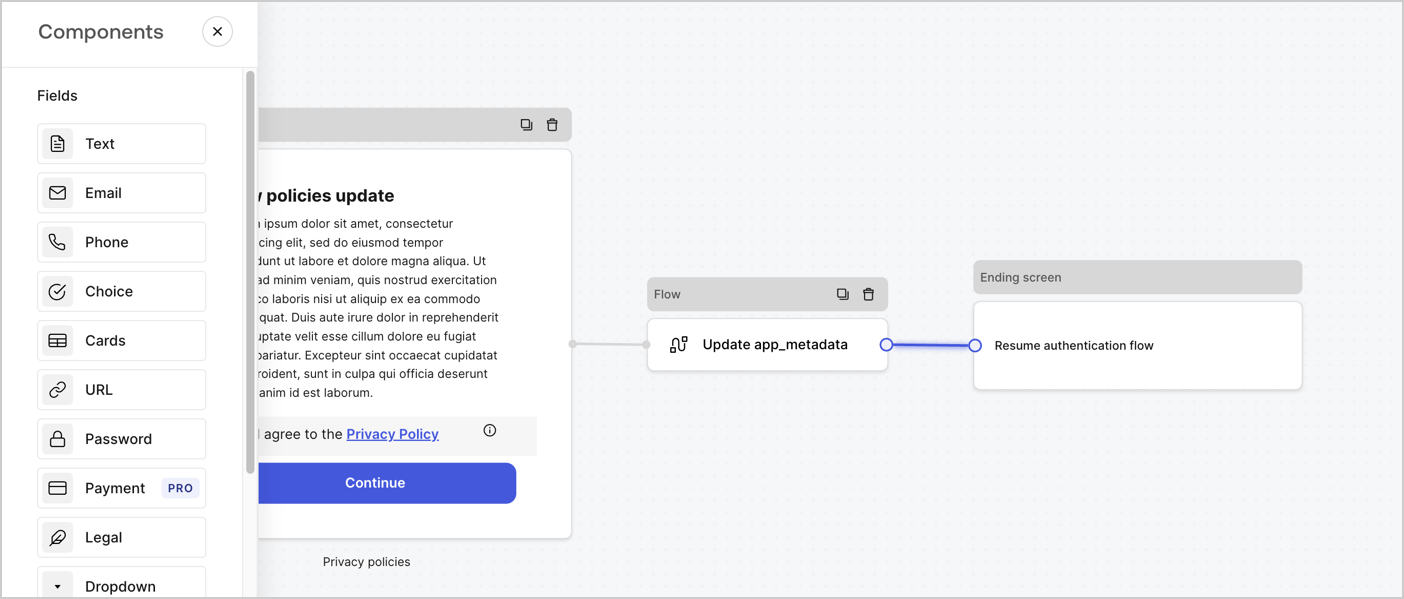
Add a **Flow** node after the **Step** node to update the `app_metadata` and resume the authentication flow by following these steps:

1. Select **Flow** from the bottom of the Form editor.
2. Remove the existing link between the **Step** and **Ending Screen** nodes.
3. Select the new **Flow** > **Click to add a flow** > **Create a new flow.**

   * Enter `Update app_metadata` in the **Name** field.
   * Select **Create**.
   * Select **Save**.
4. Link the **Flow** node to the **Step** and **Ending Screen** nodes as pictured below.
5. Select **Publish** to save.
<Frame>
  <img src="https://mintcdn.com/docs-staging-fix-cli-comand/hRNZ_VMQ3dKfW-Ml/docs/images/cdy7uua7fh8z/6YIkzm7SrpM9LW76AXuRzh/353c518fe82bbaa440836da1d83596d6/link-policies.png?fit=max&auto=format&n=hRNZ_VMQ3dKfW-Ml&q=85&s=91e9fc3f0d746221f320ada1aaef01ba" alt="Dashboard > Actions > Forms > Form" data-og-width="1404" width="1404" data-og-height="599" height="599" data-path="docs/images/cdy7uua7fh8z/6YIkzm7SrpM9LW76AXuRzh/353c518fe82bbaa440836da1d83596d6/link-policies.png" data-optimize="true" data-opv="3" srcset="https://mintcdn.com/docs-staging-fix-cli-comand/hRNZ_VMQ3dKfW-Ml/docs/images/cdy7uua7fh8z/6YIkzm7SrpM9LW76AXuRzh/353c518fe82bbaa440836da1d83596d6/link-policies.png?w=280&fit=max&auto=format&n=hRNZ_VMQ3dKfW-Ml&q=85&s=5ad9f274e1a07a11fa3c355516e3030c 280w, https://mintcdn.com/docs-staging-fix-cli-comand/hRNZ_VMQ3dKfW-Ml/docs/images/cdy7uua7fh8z/6YIkzm7SrpM9LW76AXuRzh/353c518fe82bbaa440836da1d83596d6/link-policies.png?w=560&fit=max&auto=format&n=hRNZ_VMQ3dKfW-Ml&q=85&s=ab64642c2fdf4c5854d5eda44210d111 560w, https://mintcdn.com/docs-staging-fix-cli-comand/hRNZ_VMQ3dKfW-Ml/docs/images/cdy7uua7fh8z/6YIkzm7SrpM9LW76AXuRzh/353c518fe82bbaa440836da1d83596d6/link-policies.png?w=840&fit=max&auto=format&n=hRNZ_VMQ3dKfW-Ml&q=85&s=452084aa6787f3b9a91be17b6a3bfc65 840w, https://mintcdn.com/docs-staging-fix-cli-comand/hRNZ_VMQ3dKfW-Ml/docs/images/cdy7uua7fh8z/6YIkzm7SrpM9LW76AXuRzh/353c518fe82bbaa440836da1d83596d6/link-policies.png?w=1100&fit=max&auto=format&n=hRNZ_VMQ3dKfW-Ml&q=85&s=41500e10a902095803d222f8915cd94b 1100w, https://mintcdn.com/docs-staging-fix-cli-comand/hRNZ_VMQ3dKfW-Ml/docs/images/cdy7uua7fh8z/6YIkzm7SrpM9LW76AXuRzh/353c518fe82bbaa440836da1d83596d6/link-policies.png?w=1650&fit=max&auto=format&n=hRNZ_VMQ3dKfW-Ml&q=85&s=b29f71b35646bee2e7703f00dc767934 1650w, https://mintcdn.com/docs-staging-fix-cli-comand/hRNZ_VMQ3dKfW-Ml/docs/images/cdy7uua7fh8z/6YIkzm7SrpM9LW76AXuRzh/353c518fe82bbaa440836da1d83596d6/link-policies.png?w=2500&fit=max&auto=format&n=hRNZ_VMQ3dKfW-Ml&q=85&s=29c462aa384e357a39d590f90a8c78a3 2500w" />
</Frame>

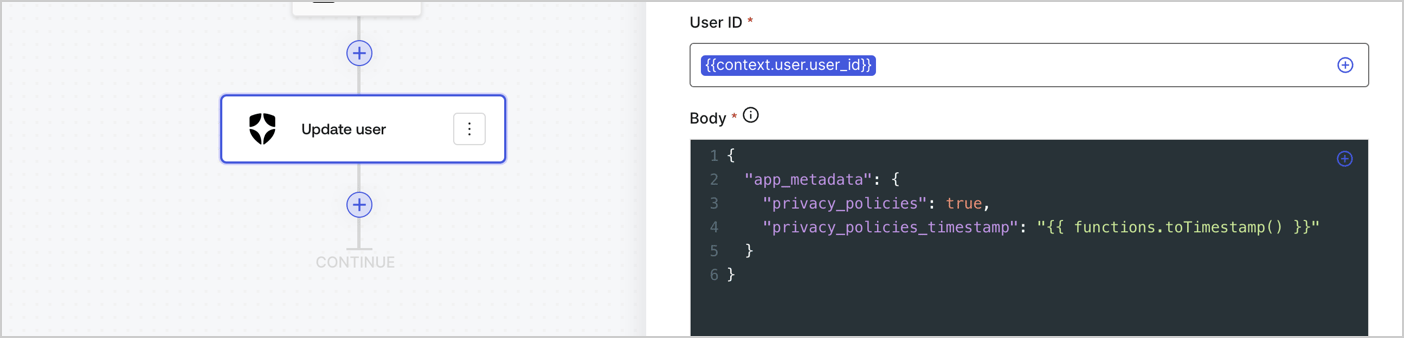
Add an Auth0 Update user action to the flow by following these steps:

1. Select the **Flow** **Update app\_metadata** > **Edit flow** to open the Flow editor in a new tab.
2. Below the StartAction, select the **+** icon to add an **Update user** action. Complete the fields below, then select **Save** to continue.

   * **Connection**: Select from the dropdown the Vault connection to your M2M application.

   * **User ID**: Enter `{{context.user.user_id}}`.

   * **Body**: Copy and paste the following code to update the app\_metadata with the privacy\_policies and privacy\_policies\_timestamp properties.

     ```text lines theme={null}
     {
       "app_metadata": {
         "privacy_policies": true,
         "privacy_policies_timestamp": "{{ functions.toTimestamp() }}"
       }
     }
     ```

   * Select **Save**.
3. Select **Publish** to save.
<Frame>
  <img src="https://mintcdn.com/docs-staging-fix-cli-comand/MoaBDlk6o0Xg-8j6/docs/images/cdy7uua7fh8z/CvMNIwWrOUwaFW4X3G28p/1fb70ae57a20749d9ffaaba8dc0b7e26/update-user-privacy.png?fit=max&auto=format&n=MoaBDlk6o0Xg-8j6&q=85&s=4ede1b403c0db88bb3bb7a9826479d77" alt="Dashboard > Actions > Forms > User case privacy policy code" data-og-width="1404" width="1404" data-og-height="338" height="338" data-path="docs/images/cdy7uua7fh8z/CvMNIwWrOUwaFW4X3G28p/1fb70ae57a20749d9ffaaba8dc0b7e26/update-user-privacy.png" data-optimize="true" data-opv="3" srcset="https://mintcdn.com/docs-staging-fix-cli-comand/MoaBDlk6o0Xg-8j6/docs/images/cdy7uua7fh8z/CvMNIwWrOUwaFW4X3G28p/1fb70ae57a20749d9ffaaba8dc0b7e26/update-user-privacy.png?w=280&fit=max&auto=format&n=MoaBDlk6o0Xg-8j6&q=85&s=80c8f4bea848fd5a8ef50b2d651a0979 280w, https://mintcdn.com/docs-staging-fix-cli-comand/MoaBDlk6o0Xg-8j6/docs/images/cdy7uua7fh8z/CvMNIwWrOUwaFW4X3G28p/1fb70ae57a20749d9ffaaba8dc0b7e26/update-user-privacy.png?w=560&fit=max&auto=format&n=MoaBDlk6o0Xg-8j6&q=85&s=43c15ac0b04f3d0d9c0683576ca52ab5 560w, https://mintcdn.com/docs-staging-fix-cli-comand/MoaBDlk6o0Xg-8j6/docs/images/cdy7uua7fh8z/CvMNIwWrOUwaFW4X3G28p/1fb70ae57a20749d9ffaaba8dc0b7e26/update-user-privacy.png?w=840&fit=max&auto=format&n=MoaBDlk6o0Xg-8j6&q=85&s=18568dde3601905bd5a9698ad1b7e457 840w, https://mintcdn.com/docs-staging-fix-cli-comand/MoaBDlk6o0Xg-8j6/docs/images/cdy7uua7fh8z/CvMNIwWrOUwaFW4X3G28p/1fb70ae57a20749d9ffaaba8dc0b7e26/update-user-privacy.png?w=1100&fit=max&auto=format&n=MoaBDlk6o0Xg-8j6&q=85&s=2ef25f0aa3d89123c2673a682d431d6a 1100w, https://mintcdn.com/docs-staging-fix-cli-comand/MoaBDlk6o0Xg-8j6/docs/images/cdy7uua7fh8z/CvMNIwWrOUwaFW4X3G28p/1fb70ae57a20749d9ffaaba8dc0b7e26/update-user-privacy.png?w=1650&fit=max&auto=format&n=MoaBDlk6o0Xg-8j6&q=85&s=189f0133b3895135063f24529960ad66 1650w, https://mintcdn.com/docs-staging-fix-cli-comand/MoaBDlk6o0Xg-8j6/docs/images/cdy7uua7fh8z/CvMNIwWrOUwaFW4X3G28p/1fb70ae57a20749d9ffaaba8dc0b7e26/update-user-privacy.png?w=2500&fit=max&auto=format&n=MoaBDlk6o0Xg-8j6&q=85&s=dd05e3c4c6f52d09ae6e4dbba874ea5e 2500w" />
</Frame>

<Callout icon="file-lines" color="#0EA5E9" iconType="regular">
  The flow **Update app\_metadata** adds a `privacy_policies true` value to the app`_metadata` object and also generates a timestamp with a [helper function.](/docs/customize/forms/variables)
</Callout>

## Retrieve the form render code

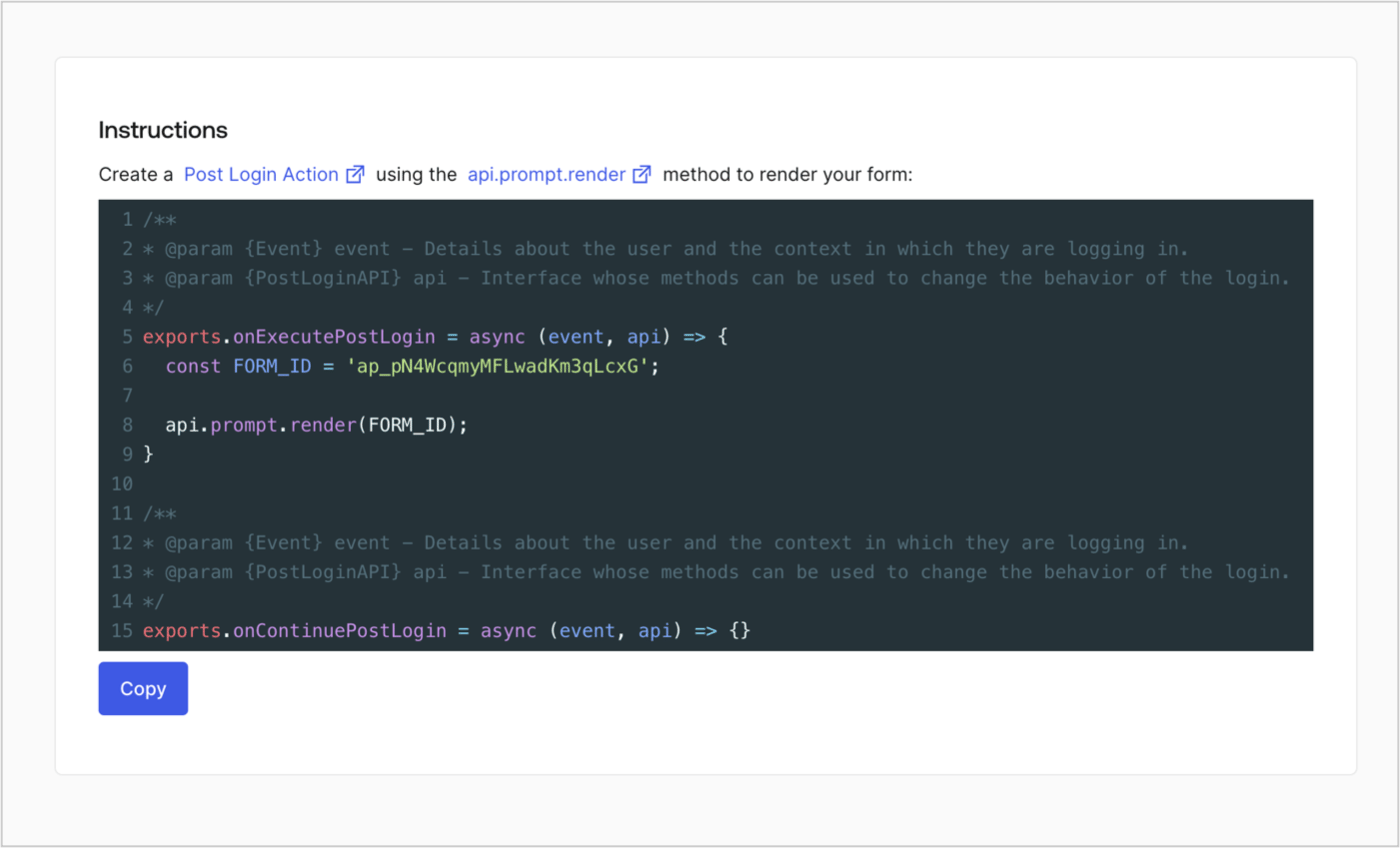
Retrieve your form render code to visually render the form with a custom Post Login Action by following these steps:

* From the Form editor, select **`<> Render`**.
* Select **Copy**.
<Frame>
  <img src="https://mintcdn.com/docs-staging-fix-cli-comand/PRZncXXUju_nWM1m/docs/images/cdy7uua7fh8z/2EIUzc539sq9lwoTKbjoJv/496a864c0fc44a782c9cadca119dbfb0/embed.png?fit=max&auto=format&n=PRZncXXUju_nWM1m&q=85&s=5f614d857719e2378d5a3970849a8d65" alt="Dashboard > Actions > Forms > Form > Embed" data-og-width="1400" width="1400" data-og-height="848" height="848" data-path="docs/images/cdy7uua7fh8z/2EIUzc539sq9lwoTKbjoJv/496a864c0fc44a782c9cadca119dbfb0/embed.png" data-optimize="true" data-opv="3" srcset="https://mintcdn.com/docs-staging-fix-cli-comand/PRZncXXUju_nWM1m/docs/images/cdy7uua7fh8z/2EIUzc539sq9lwoTKbjoJv/496a864c0fc44a782c9cadca119dbfb0/embed.png?w=280&fit=max&auto=format&n=PRZncXXUju_nWM1m&q=85&s=f061c58d810092239644b865ae82c1a6 280w, https://mintcdn.com/docs-staging-fix-cli-comand/PRZncXXUju_nWM1m/docs/images/cdy7uua7fh8z/2EIUzc539sq9lwoTKbjoJv/496a864c0fc44a782c9cadca119dbfb0/embed.png?w=560&fit=max&auto=format&n=PRZncXXUju_nWM1m&q=85&s=e476a75d26b8f99386c585b376157e92 560w, https://mintcdn.com/docs-staging-fix-cli-comand/PRZncXXUju_nWM1m/docs/images/cdy7uua7fh8z/2EIUzc539sq9lwoTKbjoJv/496a864c0fc44a782c9cadca119dbfb0/embed.png?w=840&fit=max&auto=format&n=PRZncXXUju_nWM1m&q=85&s=d8627613299f839b20b438484b245467 840w, https://mintcdn.com/docs-staging-fix-cli-comand/PRZncXXUju_nWM1m/docs/images/cdy7uua7fh8z/2EIUzc539sq9lwoTKbjoJv/496a864c0fc44a782c9cadca119dbfb0/embed.png?w=1100&fit=max&auto=format&n=PRZncXXUju_nWM1m&q=85&s=783912d1be645d8907867460531b9757 1100w, https://mintcdn.com/docs-staging-fix-cli-comand/PRZncXXUju_nWM1m/docs/images/cdy7uua7fh8z/2EIUzc539sq9lwoTKbjoJv/496a864c0fc44a782c9cadca119dbfb0/embed.png?w=1650&fit=max&auto=format&n=PRZncXXUju_nWM1m&q=85&s=55c5ebd89d5de8fc30d7b669905a26b0 1650w, https://mintcdn.com/docs-staging-fix-cli-comand/PRZncXXUju_nWM1m/docs/images/cdy7uua7fh8z/2EIUzc539sq9lwoTKbjoJv/496a864c0fc44a782c9cadca119dbfb0/embed.png?w=2500&fit=max&auto=format&n=PRZncXXUju_nWM1m&q=85&s=7783efc01080aabbfb73458c11e31fc3 2500w" />
</Frame>

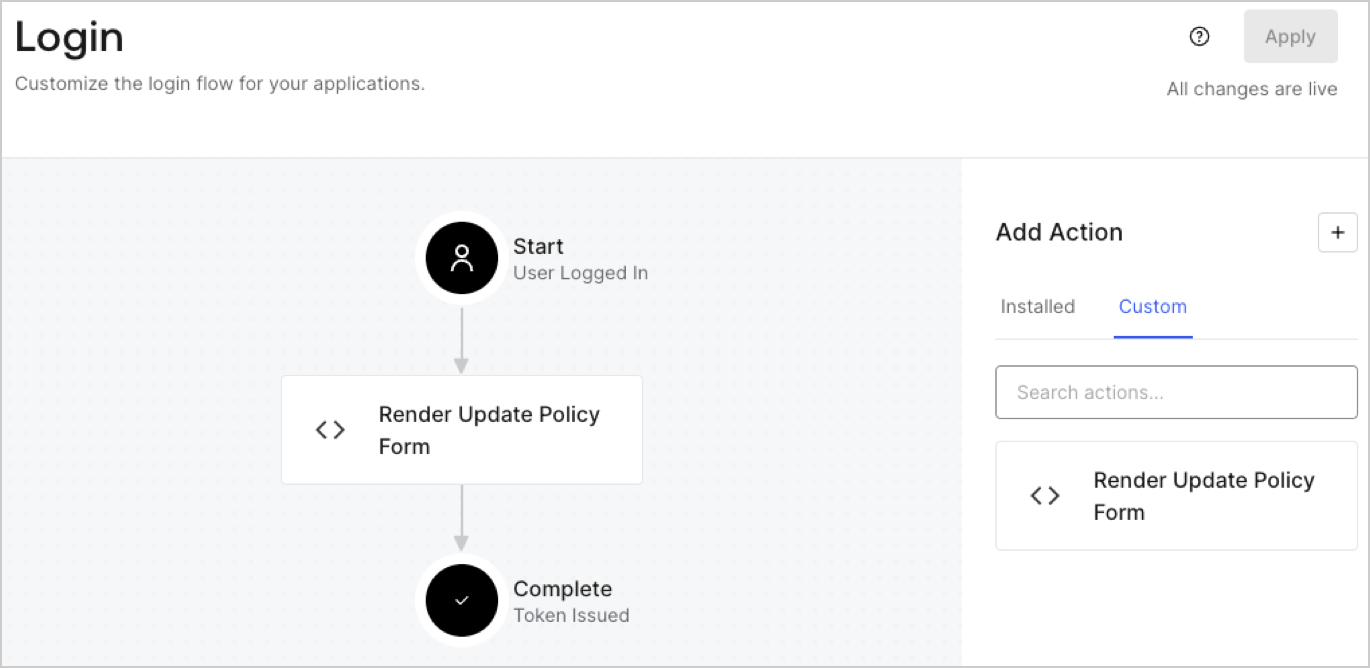
## Create a Post Login Action

Create a post-login Action to render your form by following these steps:

1. Navigate to **Auth0 Dashboard > Actions > Flows > Login.**
2. Select the **+** icon and Select **Build from scratch**:

   * **Name**: Enter `Render Update Policy Form`.
   * **Trigger**: Select `Login / Post Login`.
   * **Runtime**: Select the recommended version.
3. Select **Create**.

To configure the post-login Action:

1. Delete the existing code from the Code editor.
2. Paste the form render code into the Code editor.
3. Edit the code to define the conditional logic that will render the form.

   ```javascript lines theme={null}
   /**
   * @param {Event} event - Details about the user and the context in which they are logging in.
   * @param {PostLoginAPI} api - Interface whose methods can be used to change the behavior of the login.
   */
   exports.onExecutePostLogin = async (event, api) => {
     const FORM_ID = 'REPLACE_WITH_YOUR_FORM_ID';

     if (event.user.app_metadata.privacy_policies !== true) {
       api.prompt.render(FORM_ID);
     }
   }

   exports.onContinuePostLogin = async (event, api) => { }
   ```

   <Callout icon="file-lines" color="#0EA5E9" iconType="regular">
     The example code above will render the form when a user is missing the app metadata `privacy_policies` property.
   </Callout>
4. Select **Deploy.**
5. Drag and Drop the **Render Update Policy Form** Action to the **Login** flow.
   <Frame>
     <img src="https://mintcdn.com/docs-staging-fix-cli-comand/JZf2_fMxfuI9hUtV/docs/images/cdy7uua7fh8z/5TOwDgevZsBqd7yZynUYWU/41ca909dc3007aed4f40ff794a05efa5/postlogin.png?fit=max&auto=format&n=JZf2_fMxfuI9hUtV&q=85&s=94609b14cafd8c3947bbd0a5667311b6" alt="Dashboard > Forms > Use Case > Render update policy form login action" data-og-width="1370" width="1370" data-og-height="668" height="668" data-path="docs/images/cdy7uua7fh8z/5TOwDgevZsBqd7yZynUYWU/41ca909dc3007aed4f40ff794a05efa5/postlogin.png" data-optimize="true" data-opv="3" srcset="https://mintcdn.com/docs-staging-fix-cli-comand/JZf2_fMxfuI9hUtV/docs/images/cdy7uua7fh8z/5TOwDgevZsBqd7yZynUYWU/41ca909dc3007aed4f40ff794a05efa5/postlogin.png?w=280&fit=max&auto=format&n=JZf2_fMxfuI9hUtV&q=85&s=641eefaf966a9bdd2a79e83302a8563a 280w, https://mintcdn.com/docs-staging-fix-cli-comand/JZf2_fMxfuI9hUtV/docs/images/cdy7uua7fh8z/5TOwDgevZsBqd7yZynUYWU/41ca909dc3007aed4f40ff794a05efa5/postlogin.png?w=560&fit=max&auto=format&n=JZf2_fMxfuI9hUtV&q=85&s=1066bb96709a1dfea84fdcb78d14483c 560w, https://mintcdn.com/docs-staging-fix-cli-comand/JZf2_fMxfuI9hUtV/docs/images/cdy7uua7fh8z/5TOwDgevZsBqd7yZynUYWU/41ca909dc3007aed4f40ff794a05efa5/postlogin.png?w=840&fit=max&auto=format&n=JZf2_fMxfuI9hUtV&q=85&s=e9696d8c1e2c455c6498065cc51d395e 840w, https://mintcdn.com/docs-staging-fix-cli-comand/JZf2_fMxfuI9hUtV/docs/images/cdy7uua7fh8z/5TOwDgevZsBqd7yZynUYWU/41ca909dc3007aed4f40ff794a05efa5/postlogin.png?w=1100&fit=max&auto=format&n=JZf2_fMxfuI9hUtV&q=85&s=c3f02fda200506cb4a833ad76e836c9a 1100w, https://mintcdn.com/docs-staging-fix-cli-comand/JZf2_fMxfuI9hUtV/docs/images/cdy7uua7fh8z/5TOwDgevZsBqd7yZynUYWU/41ca909dc3007aed4f40ff794a05efa5/postlogin.png?w=1650&fit=max&auto=format&n=JZf2_fMxfuI9hUtV&q=85&s=5fdd283e0309018b813740ee91b83793 1650w, https://mintcdn.com/docs-staging-fix-cli-comand/JZf2_fMxfuI9hUtV/docs/images/cdy7uua7fh8z/5TOwDgevZsBqd7yZynUYWU/41ca909dc3007aed4f40ff794a05efa5/postlogin.png?w=2500&fit=max&auto=format&n=JZf2_fMxfuI9hUtV&q=85&s=f67743a2ff617d8c424a75474370e162 2500w" />
   </Frame>
6. Select **Apply.**

### Test implementation

Test the implementation by following these steps:

1. Log in with an existing user whose app`_metadata` attribute `privacy_policies` does not have a value.
2. The post-login Action in the Login flow will render the form and prompt for acceptance.
3. Select **Auth0 Dashboard > User Management > Users,** locate the user and verify that the `app_metadata` attribute `privacy_policies` contains a `true` value and a timestamp.
